
|
Home | Site Map | Contact Us |
     
|
EXIF Purge: Limitations and an AlternativeEXIF Purge is a free batch JPEG photo metadata remover for Windows® by Uconomix Technologies. It's an offline and portable desktop application with a very simple graphical user interface. (GUI) As the integral metadata remover of Windows 11 - the "Remove Properties and Personal Information" feature - leaves behind in JPEG files a wealth of potentially privacy-compromising metadata, a third-party relible tool is essential. However, EXIF Purge has a few limitations and drawbacks, making it less than ideal for the task. These include:
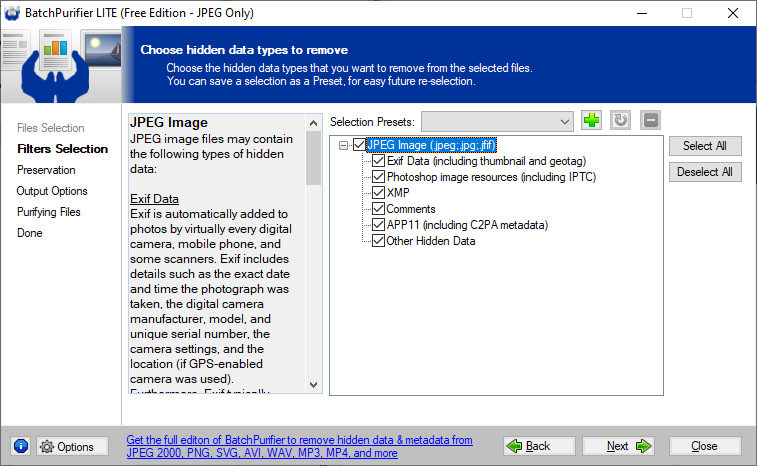
Alternative to EXIF Purge: BatchPurifier LITEBatchPurifier LITE™ is a free offline tool with an easy-to-use graphical user interface (GUI) for Windows® to quickly and thoroughly remove hidden metadata from JPEG photo files in batch. It does not have any of the aforementioned limitations and drawbacks that EXIF Purge has. BatchPurifier LITE™ is the freeware edition of BatchPurifier™. (which supports 28 file types, including Microsoft Office® Word, Excel, and PowerPoint, LibreOffice®, and PDF) BatchPurifier LITE™ is able to permanently and thoroughly remove all possible JPEG hidden data & metadata, supporting the selective removal of the following metadata types: Exif data, (including thumbnail & geotag) IPTC data, XMP data, JPEG comments, C2PA metadata, other hidden data. BatchPurifier LITE™ removes hidden data & metadata from files as a quality lossless operation, while keeping the image intact and without degrading its quality. BatchPurifier LITE™ lets the user add files and entire folders for processing. It can be set to process subfolders and zipped files as well, and can process thousands of files across different folders at once. BatchPurifier LITE™ allows the user to either save the purified files as new files in a specified folder, or to overwrite the original files. BatchPurifier LITE™ integrates with the shell menu, enabling the user to easily send files and folders for purification directly from the Windows file explorer. These features give the user greater comfort, flexibility, and productivity. BatchPurifier LITE™ has been downloaded more than 1 million times since 2009.  Freeware The following screenshots show how BatchPurifier LITE™ can be used. The simple & straightforward wizard-like graphical user interface, (GUI) of BatchPurifier LITE™ guides the user through the steps required to easily remove hidden metadata from multiple photo files in different folders at once. 


Freeware Related White Papers
|
| ©2026 Digital Confidence Ltd. All rights reserved. Privacy Statement | Site Map | Contact Us |