
|
Home | Site Map | Contact Us |
     
|
How to Reliably Remove Metadata from Image FilesImage files, whether of photos taken with a digital camera or a smartphone, or pictures created using a painting application or by an AI generator, usually contain a wealth of hidden metadata. Some is automatically added by the capturing device and any software used to process the image, and some can manually be added using an image management software or a metadata editor. While this metadata is useful for finding images and learning about them, it poses a serious privacy and confidentiality risks when the images are shared. It's possible to avoid these risks by removing image metadata from files before sharing them. This can be achieved with an appropriate software. Examples of such software are the free BatchPurifier LITE™ for JPEG, and the full BatchPurifier™ for JPEG, JPEG 2000, PNG, WebP, and SVG. Image metadata can be structured in several formats that can reside alongside each other in the file. The most common are:
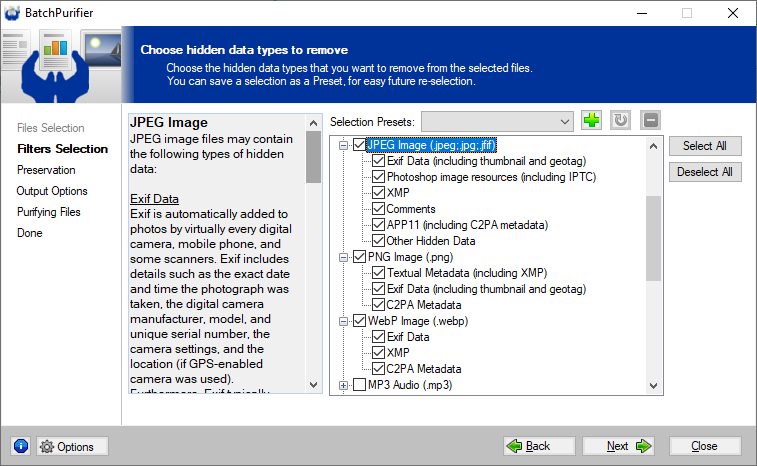
These metadata formats can contain a multitude of potentially privacy-compromising information, including creator's name, creation date, unique serial numbers of the camera and lens, and location data. To protect their privacy, people often wish to remove these metadata before sharing images with others. Non-reliable methods for removing image metadataNovice users may attempt to get rid of image metadata by taking a screenshot of the images or by converting them from one file format to another. However, these are not reliable methods as they could introduce new harmful metadata and since they will inevitably degrade the image quality in the case of formats that employ lossy compression algorithms, like JPEG and the lossy variant of WebP. The later method could also pass-through the original metadata to the new files. There are no safe and reliable shortcuts for removing image metadata. One should always use a dedicated and reliable image metadata remover for the task. Using a dedicated image metadata removerThe best and most reliable way to remove image metadata is to use a dedicated image metadata remover. Since different image file formats are built internally in a different manner, a software must be designed specifically for removing particular metadata types from particular image file types. A software can be designed to have a multi-format capability, allowing it to clean multiple particular image file types. Windows® 11 has a very limited built-in metadata remover - the "Remove Properties and Personal Information" feature. It can partially remove Exif data and XMP data from JPEG photos and HEIF/HEIC/AVIF photos. It can also remove a few XMP properties from TIFF files, and a single property from PNG files - "Date taken". These and other limitations necessitates a reliable and comprehensive third-party image metadata remover. One such software for Windows® is BatchPurifier™. BatchPurifier™ can completely remove Exif data, XMP data, and C2PA metadata from multiple JPEG, JPEG 2000, PNG, WebP, and SVG files in batch. As an offline desktop application, it's safer, faster and more convenient to use than an online web service. BatchPurifier™ removes metadata as an image quality lossless operation, while keeping the images intact and without degrading their quality. BatchPurifier™ is a privacy-oriented hidden data & metadata remover that has an easy-to-use graphical user interface, (GUI) and supports the removal of more than 60 types of hidden data & metadata from various types of image, video, audio, and document files. It has a free edition that supports JPEG files only - BatchPurifier LITE™. The following two screenshots show how image metadata can be removed. The first screenshot shows how the free BatchPurifier LITE™ is used to remove metadata from JPEG files. The second screenshot shows how the full BatchPurifier™ is used to remove metadata from JPEG, PNG, and WebP files. 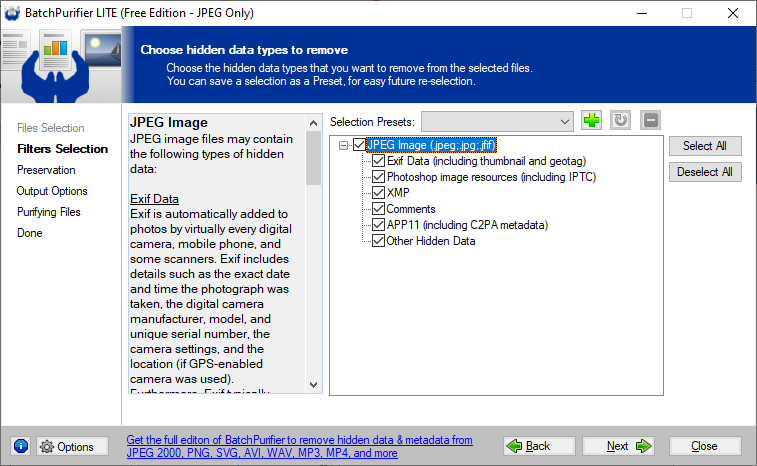
Related White Papers
|
| ©2026 Digital Confidence Ltd. All rights reserved. Privacy Statement | Site Map | Contact Us |