Remove Hidden Data & Metadata From Your Attachments With

ConfidentSend™

Data Leakage Prevention Add-on for Microsoft Outlook® and Mozilla Thunderbird™


Hidden Data FAQ
learn about hidden data & metadata, the risks they pose, and how our products can remedy them
ConfidentSend™ is the most comprehensive, user friendly and fast solution for removing hidden data & metadata from E-mail attachments.

Hidden data stored in many popular file types may contain confidential and private information that when exposed can cause you and your organization embarrassment with possible financial and legal implications.

ConfidentSend™ can remove hidden data from Microsoft Office® documents (Word, Excel, PowerPoint), OpenOffice.org documents, PDF documents, and popular image and media file types such as JPEG, PNG, and SVG. ConfidentSend™ can remove hidden data from files even if they are compressed within ZIP files.

ConfidentSend™ seamlessly integrates with Microsoft Outlook® or with Mozilla Thunderbird™ email clients, inspects and cleans the attachments of each and every outgoing email. ConfidentSend™ also warns the user when sensitive content is found in the e-mail message and its attachments.

With ConfidentSend™ you can free yourself and your organization from the worry of unintentional sensitive data leakage through the hidden data stored in email attachments.

Lawyers, especially, must be concerned about confidentiality of communications. ConfidentSend is an easy to use, inexpensive, and comprehensive, software solution to this problem.
-- Richard M. "Rick" Georges, FutureLawyer. (more reviews)
download
14 day fully functional trial
Purchase
$29 (lifetime license)

Using ConfidentSend™ to Remove Hidden Data & Metadata

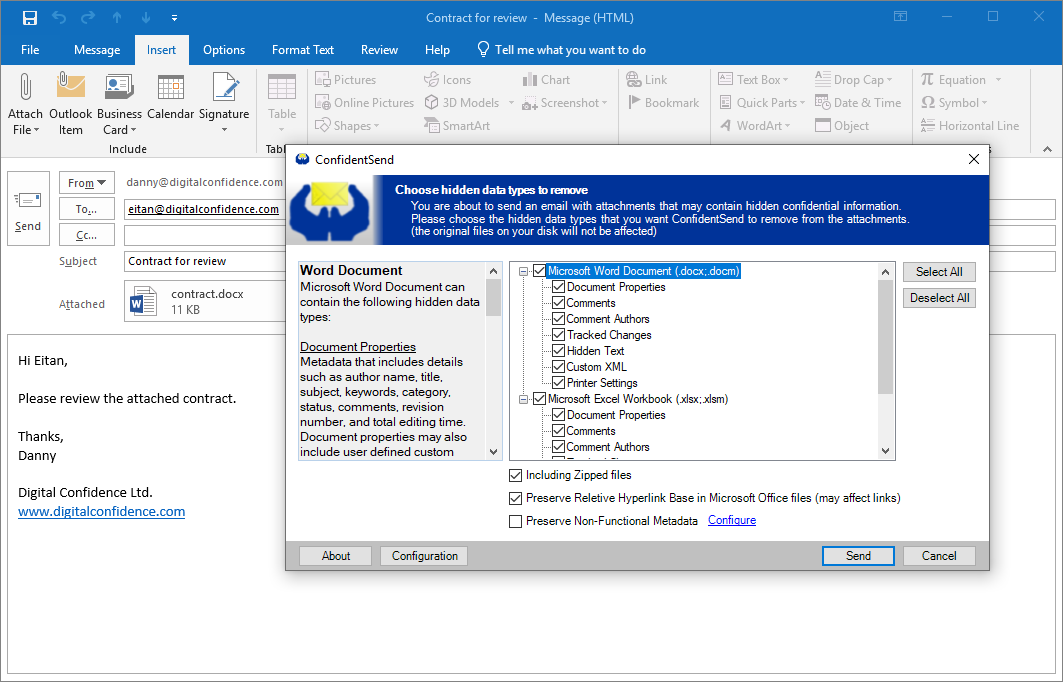
When an email is being sent, ConfidentSend™ prompts the user for hidden data types to be removed from the attachments. ConfidentSend™ then inspects the attachments and removes these hidden data types. ConfidentSend™ can also be configured to clean attachments automatically without prompting the user.

Screenshot of ConfidentSend as a Microsoft Office Outlook 2007 add-in, used to remove metadata from Word document

Supported Formats & Hidden Data Types

The following table summarizes the hidden data types that Digital Confidence DataDistiller™ Engine, which powers ConfidentSend™, is able to remove. For detailed explanation, see the DataDistiller™ Engine page.

Supported File Formats Extensions Supported Hidden Data Types
Microsoft® Word Document .docx;.docm Document Properties; Comments; Tracked Changes;
Hidden Text; Custom XML
Microsoft Excel® Workbook .xlsx;.xlsm Document Properties; Comments; Tracked Changes; Custom XML
Microsoft PowerPoint® Presentation .pptx;.pptm Document Properties; Comments; Slide Notes; Custom XML
OpenDocument Text .odt Document Properties; Comments; Tracked Changes; Versions
OpenDocument Spreadsheet .ods Document Properties; Comments; Tracked Changes; Versions
OpenDocument Presentation .odp Document Properties; Slide Notes; Versions
OpenDocument Graphics .odg Document Properties; Versions
PDF Document (partial support*) .pdf Metadata (including XMP)
AVI Video .avi INFO; XMP; Other Hidden Data
JPEG Image .jpeg;.jpg EXIF (including thumbnail); Photoshop image resources (including IPTC-NAA); XMP; Comments; ICC Profile; Other Hidden Data
JPEG 2000 Image .jp2 Metadata (including native metadata, XMP, and other hidden data)
WAVE / BWF Audio .wav INFO; EXIF; Broadcast Audio Extension; axml; iXML; XMP; ID3; Cart Chunk; Other Hidden Data
PNG Image .png Metadata (including XMP)
SVG Graphics .svg;.svgz Metadata
MP3 Audio .mp3 ID3 Metadata (including XMP)
MP4 File .mp4;.m4a
.m4v;.m4b
Metadata (including native metadata, XMP, and other hidden data)
3GP File .3gp Metadata
F4V File .f4v Metadata (including native metadata, XMP, and other hidden data)
AIFF Audio .aif;.aiff Native Metadata; ID3; Other Hidden Data
XML/XSD/XSL .xml;.xsd;.xsl Comments

System Requirements

Required Hardware:

600 MHz processor
256 MB RAM
40 MB free disk space

Required Software:

Microsoft® .NET Framework v2.0
(or later version. If not present, the setup program will direct the user to its free download page)

Supported Operating Systems:

Windows® 7
Windows Vista®
Windows® XP Service Pack 2 (or later version)
Windows Server® 2008
Windows Server® 2003
Windows® 2000 Service Pack 3
Windows® ME
Windows® 98 Second Edition
Windows® 98

Supported E-mail Clients:

Microsoft Outlook® 2003/2007/2010
Mozilla Thunderbird™ 1.5 (or later version)

Key Features & Benefits

  • Comprehensive - ConfidentSend™ can remove more than 50 types of hidden data from 20 file types, more than any other solution on the market today.
  • ZIP Cleaning - ConfidentSend™ is able to remove hidden data from files even if they are compressed within ZIP files.
  • Content Inspection - ConfidentSend™ can find sensitive contents in the email message and its attachments (Word, PowerPoint, OpenOffice) by using regular expressions, and warn the user.
  • Automatic Mode - ConfidentSend™ can be configured to clean attachments automatically without prompting for purification options.
  • Whitelist - Recipients for which email attachments should not be cleaned can be specified.
  • Easy to Use - ConfidentSend™ has a very simple & straightforward user interface.
  • Fast - ConfidentSend™ is fast and highly efficient with resource use.
  • Seamless Integration - ConfidentSend™ seamlessly integrates with Microsoft Outlook® or with Mozilla Thunderbird™.